Game Radar - Freebie Tracker
- 0.0
- Rating
- 10.00K
- Installs
- Free
- Price

 Analysis by App-foxy
I installed Game Radar - Freebie Tracker to see whether it could make the hunt for free games and digital discounts less scattered. The app comes from T Code and sits in the events category, but I found its practical role closer to a compact deal-watching tool for people who move between Steam, Epic, the Play Store, and downloadable content offers.
The starting problem is familiar: a free game appears for a short time, a DLC price drops, or an app becomes available without charge, but the offer is easy to miss when you check each store separately. Game Radar is built around that moment of discovery. Its short store description calls it “Game Radar,” while its broader purpose is to bring free games, apps, DLCs, and discounts into one place. That focus makes it appealing to bargain hunters, although it is not automatically the best choice for someone who wants a full game library or a detailed recommendation engine.
How I used Game Radar from discovery to decision
I use Game Radar as the first stop in a small decision-making routine: spot an offer, check whether it fits my interests and platform, then confirm the details at the original store. That approach helps me judge its speed and usefulness without mistaking a quick discovery tool for a complete storefront. It also sets up the next question: how well does that routine hold up when I check more than one kind of offer?
You May Also Like

 Blood Strike: 2.5 Anniversary
Blood Strike’s Loadouts Turn Every Drop Into a Tactical Gamble
A close look at Blood Strike’s custom loadouts: how fast access to signature weapons reshapes its battle royale rhythm, rewards preparation, and narrows the gap between fights.

 Pandora - Music & Podcasts
Pandora’s Music Is Easy to Start, but Harder to Recover
Pandora’s strength is its low-effort path from a seed to a station. Its weak spot is how much confidence it asks you to place in connection, setup, and quiet recovery.

 8 Ball Pool
 Is Built on Rivalries, Rematches, and Routine
A close look at the rivalries, rematches, shared routines, and unanswered safety questions that turn a quick pool match into a persistent mobile community.

 Samsung Music
’s Quiet Strength Is Playing What You Already Own
Its reach comes less from spectacle than from dependable access to a personal library. That simplicity is both the app’s strongest retention engine and its ceiling.

 AccuWeather: Weather Radar
AccuWeather Review: A Quick, Clear Forecast for Everyday Decisions
For everyday plans, the best forecast is the one you can understand quickly. AccuWeather makes rain timing, radar, and local conditions easy to act on, with a few trade-offs.

 Hill Climb Racing
Why Hill Climb Racing Still Turns Crashes Into One More Run
A tiny car, a bumpy hill and one more upgrade: Hill Climb Racing keeps resurfacing because its simple chaos makes every near-miss feel personal.
More From Our News Desk
View All News


Beginning with a scattered search
My usual alternative would be to open several storefronts, browse their promotional areas, check gaming news, and rely on memory for anything that might expire. That process has two weaknesses. First, it takes attention away from the actual decision: whether I want the item. Second, it makes the handoff from “I heard about this” to “I claimed or downloaded it” unnecessarily easy to lose.
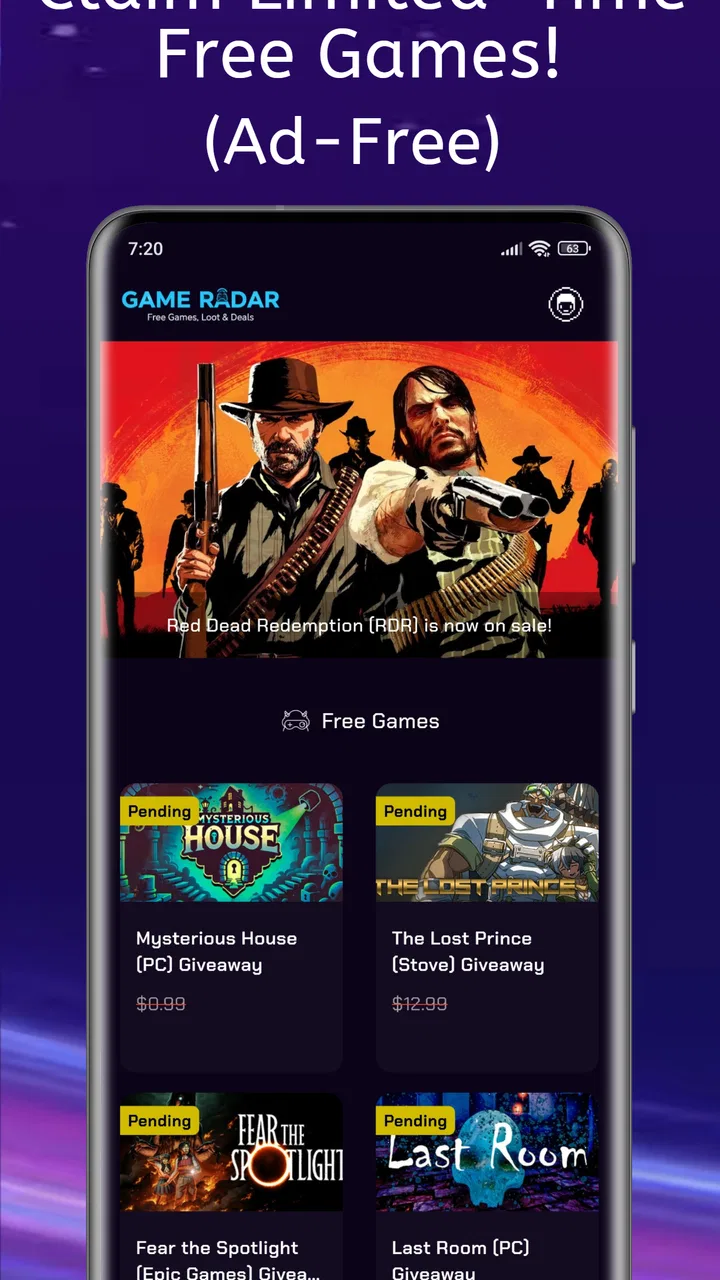
Game Radar gives that first stage a simpler shape. Instead of treating every store as a separate destination, I can start with a single feed of offers and decide which entries deserve a closer look. This is especially useful when I am not searching for one particular title. If I already know exactly what I want, going directly to the relevant store is usually faster. If I simply want to see what is available today, a focused tracker is more convenient than opening several unrelated pages.
I also like the distinction between free items and discounts. A completely free game, a free app, a DLC giveaway, and a reduced-price product are not the same kind of opportunity. Keeping them in one discovery workflow is convenient, but it also means I have to read each entry carefully rather than assuming every item costs nothing. That small habit prevents the common mistake of treating a temporary discount as a permanent free offer.
Moving from the feed to a useful shortlist
The most practical way to use the app is not to scroll endlessly. I would open it when I have a few minutes, scan the current offers, and immediately separate items into three mental groups: something I want now, something worth saving for later, and something irrelevant. This makes the app work as a filter before the store itself becomes part of the process.
A useful everyday scenario is a weekend gaming session. I might be deciding whether to spend money on a new title, then notice a free game or a discounted DLC that fits a genre I already play. Rather than buying impulsively, I can use the listing as a prompt to check the official storefront, confirm the platform, and decide whether the offer is genuinely useful. The app helps me notice possibilities; the final purchase or claim decision still belongs in the store where the transaction happens.
That separation matters. Game Radar is most valuable at the discovery stage, not as a replacement for Steam, Epic, or the Play Store. I would not expect it to manage my installed games, replace a checkout screen, or provide the same depth of account-specific information as the original storefront. Its strength is reducing the number of places I need to monitor before taking the next step.
Handling the handoff to the original store
The handoff is the point where a deal tracker proves whether it is genuinely useful. Seeing an offer is only half the job. I still need to check where it applies, whether the item matches my device or account, and whether the conditions make sense. With a cross-platform tool covering games, apps, and DLCs, that verification step should become part of my routine rather than an afterthought.
For example, a DLC may be attractive but useless if I do not own the base game on the same platform. A free app may be interesting but not worth installing if it does not fit my normal workflow. A discounted game may be available through a storefront I rarely use, creating an extra account or launcher decision. These are not reasons to dismiss Game Radar; they are reasons to treat its entries as leads that need a final check.
I found this workflow more efficient than following scattered social posts because the app keeps the initial search centered on offers. Social feeds often mix announcements, opinions, rumors, and old promotions. A dedicated tracker is easier to approach with a clear question: what free or reduced-price items should I investigate right now? The trade-off is that a store page may offer richer descriptions, user reviews, compatibility details, and account-aware purchasing information.
Turning discovery into an outcome
The outcome I want is not simply a longer list of games. It is a better decision with less wasted time. Game Radar can help me reach that outcome by making overlooked offers visible, especially when I have no specific title in mind. It is also useful for people who enjoy building a backlog without paying full price, provided they are disciplined enough not to collect items merely because they are free.
That last point is more important than it sounds. Free offers can create digital clutter just as quickly as paid purchases can create financial clutter. I would use the app with a simple rule: only follow through when the item matches a genre, platform, or practical need I already have. This turns the tracker into a decision aid rather than an endless temptation machine.
It may also suit households where different people use different platforms. One person can notice a PC offer, another can check a mobile app, and a third can verify whether a DLC fits an existing game. The handoff is not automatic; the person who finds the listing still needs to pass along the relevant title and platform context. Even so, having one discovery point is easier than asking everyone to monitor several stores independently.
What makes this approach different from ordinary store browsing
Direct storefront browsing is better when I want depth. Steam, Epic, and the Play Store are designed to complete the full journey: search, inspect, compare, purchase, install, and manage the account. They can also personalize what I see in ways a general tracker may not. If I have already chosen a product, I would usually skip the extra layer and open the original store.
Game Radar is better at breadth. Its cross-store focus gives me a reason to check for opportunities I would not discover by visiting only my preferred platform. That is the app’s clearest practical advantage. It changes the starting condition from “I need to remember which stores to check” to “I can begin with one offer-oriented view.” For a casual user, that may be enough to justify keeping it available.
Newsletters and social channels are another alternative. They can provide context, commentary, and alerts from people who explain why an offer matters. However, they can also be noisy, repetitive, and difficult to scan when I only want current freebies or discounts. Game Radar feels more direct for quick checking, while a newsletter or community is more useful when I want discussion and opinions before committing.
Practical friction I noticed in the workflow
The app’s broad scope is both helpful and demanding. Games, apps, DLCs, and discounts attract different kinds of users, so not every entry will be relevant to every person. Someone interested only in mobile applications may need to ignore gaming offers. A PC player may not care about Play Store promotions. The more categories appear together, the more important it becomes to scan selectively.
There is also a natural risk in relying on any deal-tracking workflow: offers can change while I am deciding. A listing can lead me to a storefront, but the original page is the place where I should confirm the current status and conditions. I would never treat the tracker as a guarantee that an opportunity will remain available until I act. The sensible routine is to check promptly when something genuinely interests me.
Another limitation is that discovery does not equal evaluation. A short entry can tell me that an offer exists, but it may not answer whether the game runs well on my hardware, whether an app fits my needs, or whether a DLC adds enough value. I still need to read the original product information. This makes Game Radar a front door rather than a complete buying guide.
Who should install it, and who should skip it
I would recommend it to people who regularly miss temporary offers, use more than one digital storefront, or enjoy checking what is free without visiting several services one by one. It is also a reasonable fit for someone building a low-cost game backlog and willing to verify each opportunity before claiming it.
I would be more cautious if I already have a highly organized routine inside one store. If all my purchases happen through a single platform and I rarely browse outside it, the extra discovery layer may not save much time. The same applies to users who want detailed reviews, hardware guidance, social features, or library management. Those needs belong more naturally to a storefront, review site, or community platform.
The app is free, carries an Everyone content rating, and requires Android 5.0 or later. That makes the entry barrier low for a wide range of Android users. It has reached over ten thousand installs, so it is not an unknown experiment with no audience at all, although the average rating currently sits at zero, which gives me little public feedback to use as a shortcut. I would therefore judge it by my own workflow rather than by assuming broad approval.
Version context and long-term usefulness
The current version is 3.0.0, and the app was released on January 5, 2025. Those details matter mainly because a tracker lives or dies by how well it stays aligned with changing storefronts and promotional habits. A deal app needs to remain useful as users move between platforms and as offers appear and disappear. I would pay attention to whether the listings remain clear, timely, and easy to hand off to the correct store.
For regular use, I would avoid turning notifications or checking into a constant obligation, even if the app encourages frequent visits. A short, intentional check is more valuable than repeatedly browsing every offer. My preferred workflow would be to review the feed at a convenient time, shortlist only relevant items, verify them at the original store, and then close the app. That keeps the discovery benefit without allowing the search for bargains to dominate my free time.
My final assessment after following the complete path
Game Radar - Freebie Tracker works best when I treat it as a cross-platform radar, not as a replacement for the stores it watches. It starts with a real problem—too many places to monitor—and gives me a more focused route from discovery to verification. The useful result is saved attention: I can find possibilities first, then spend time only on offers that match my interests.
Its limitations are equally clear. The app cannot make every listing relevant, cannot remove the need to check the original storefront, and cannot replace detailed product research. Users who want a single-platform shopping experience may gain more by staying inside that platform. Users who enjoy finding unexpected free games, apps, DLCs, and discounts across several services are the better audience.
My recommendation is therefore practical rather than enthusiastic for everyone: install it if your current problem is missing deals, not if your problem is managing a library or choosing what to play. Used in short, deliberate sessions, Game Radar - Freebie Tracker can turn a scattered search into a manageable first step. The best habit is simple: discover in the app, verify at the source, and claim only what you will genuinely use.
FAQs for Game Radar - Freebie Tracker
01What is Game Radar - Freebie Tracker?
Game Radar - Freebie Tracker is an app designed to help gamers stay updated on the latest free games available across various platforms. It aggregates information from multiple sources to ensure users never miss out on free game promotions, offering a convenient way to access and download games without spending a dime.
02How does Game Radar notify users about new freebies?
Game Radar uses push notifications and in-app alerts to inform users about new free game offers. Users can customize their notification settings to receive alerts for specific platforms or genres, ensuring they only get notified about the freebies that interest them the most. This feature is designed to keep gamers in the loop without overwhelming them with unnecessary notifications.
03Is Game Radar - Freebie Tracker free to use?
Yes, Game Radar - Freebie Tracker is completely free to download and use. The app itself is designed to help you find free games, so there are no hidden costs or subscription fees involved. However, it may contain ads or offer in-app purchases for additional features or an ad-free experience.
04What platforms does Game Radar support?
Game Radar supports a wide range of platforms including PC, PlayStation, Xbox, and mobile devices. The app is continuously updated to include new platforms as they become popular, ensuring users have access to a comprehensive list of free game offers regardless of their preferred gaming system.
05Is my personal information safe with Game Radar?
Game Radar takes user privacy seriously and implements standard security measures to protect personal information. The app only collects necessary data to provide its services and does not share user information with third parties without consent. Users can review the app’s privacy policy for more details on data handling practices.
Pros
- Easy-to-navigate interface.
- Real-time notifications for deals.
- Customizable alerts for preferences.
- Wide range of game platforms supported.
- No intrusive ads during browsing.
Cons
- Limited support for indie games.
- Occasional lag with notifications.
- Requires internet for full functionality.
- No dark mode option available.
- Some deals are region-specific.

Game Radar - Freebie Tracker
Gallery